1
The weekly report
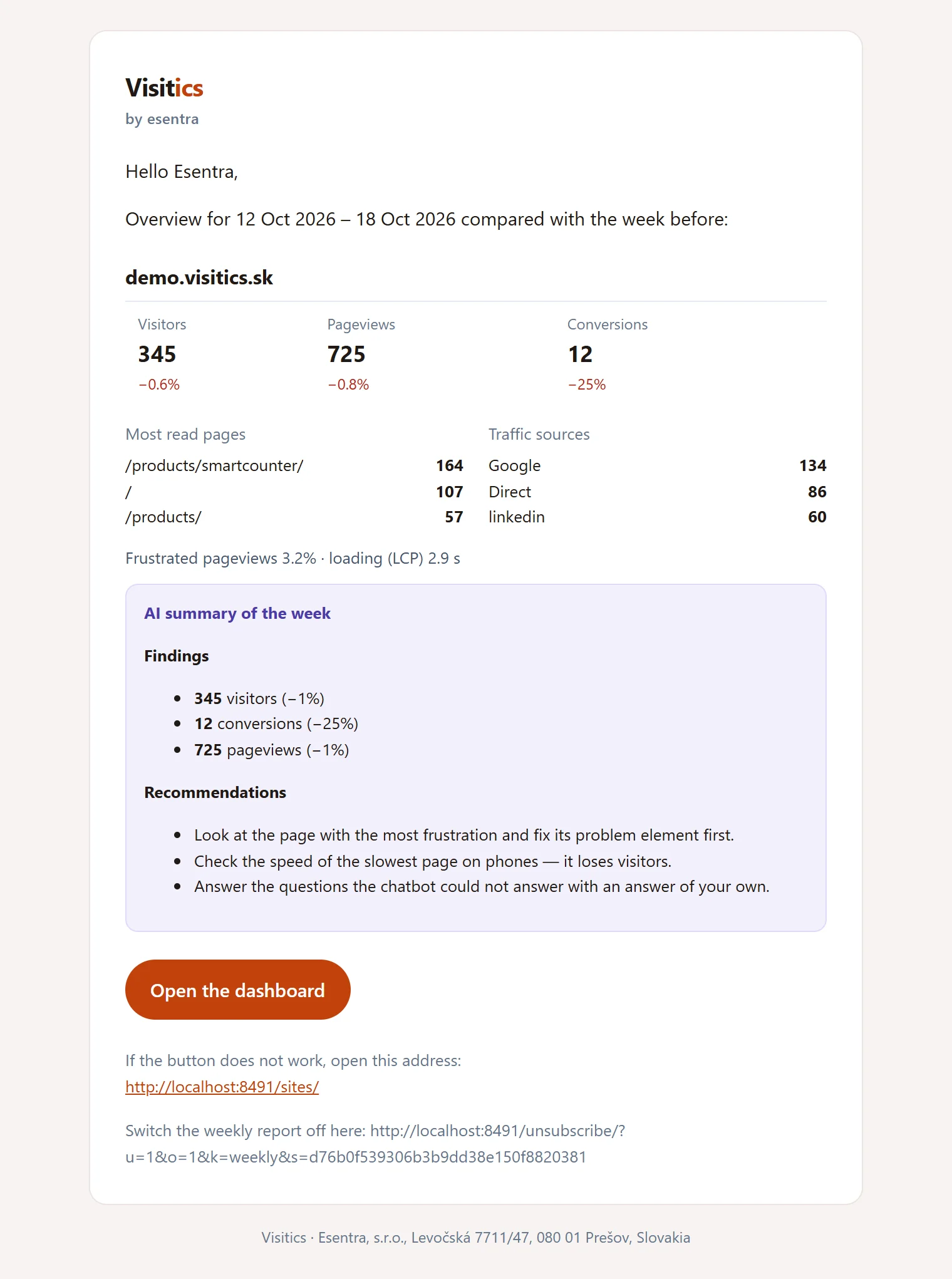
Every Monday from 7:00: the visitors, pageviews and conversions of each site with the change, the busiest pages, the speed — and from Aura an AI summary.
From the Pulse plan
The numbers come to you: a weekly report every Monday morning, an alert when something breaks, a read-only link for a client or a colleague, a CSV for a spreadsheet and an API for your own tools.
What it is for
The weekly report brings the visitors, conversions and the busiest pages of every site to your inbox.
An alert the day after a tracking outage, a traffic drop, a rise of JavaScript errors or 404 pages, or slow loading.
A read-only link for clients, a CSV of any table and an API that gives the same numbers as the dashboard.
How it works
Every Monday from 7:00: the visitors, pageviews and conversions of each site with the change, the busiest pages, the speed — and from Aura an AI summary.
Every table of the dashboard downloads as CSV in the format of your language, ready for Excel — protected against formulas.
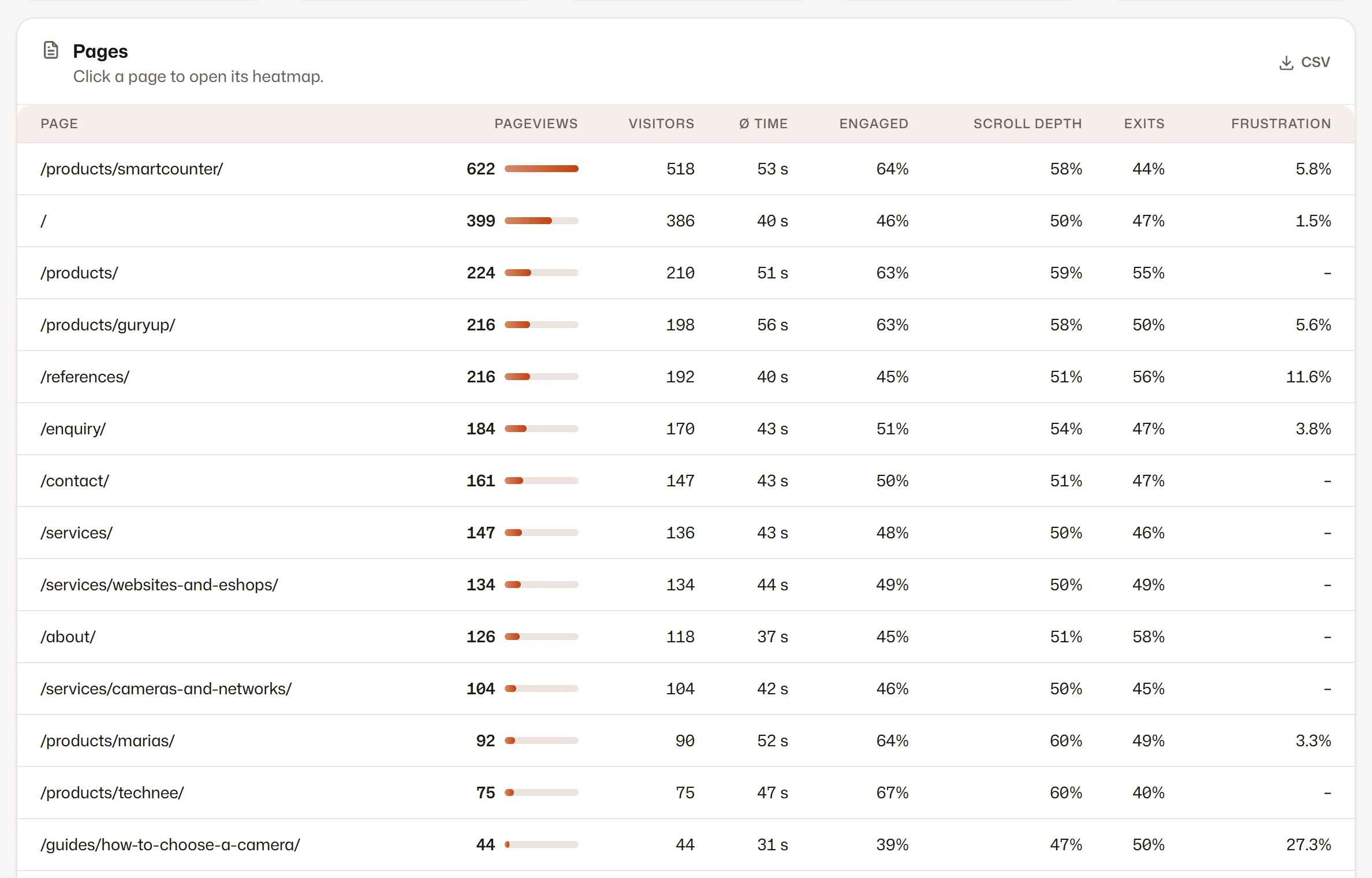
Screenshots of the Visitics dashboard with demo data.
In detail
Every Monday from 7:00 each member gets the visitors, pageviews and conversions of the sites they can see, with the change against the week before, the busiest pages and the speed. From Aura it adds the AI summary of the week, and with surveys the voice of your customers.
Visitics checks yesterday of every site: a tracking outage, a drop of traffic, a rise of JavaScript errors or 404 pages and slow loading. An alert also comes when a form stops working (from Aura) and at 80 % and 100 % of the pageviews of your plan.
A share link opens a read-only dashboard of one site without signing in, optionally with a password and an expiry date. Only a hash of the link is stored, and it stops working the moment you revoke it or the plan changes.
Every table downloads as CSV in the format of your language — a comma in English, a semicolon and a decimal comma in German and Slovak — in UTF-8 with a BOM. Cells that a spreadsheet could run as a formula are neutralised.
The owner or an admin creates an organization key on the Organization page; it is shown once, only reads and allows 600 requests an hour. /api/v1/sites lists the sites, /api/v1/stats returns any section of the dashboard for 1, 7, 30, 90 or 365 days and /api/v1/export its tables — as JSON.
Everything it does
Privacy
Plans
The values come straight from the price list. Every new organization tries Aura free for 14 days, without a payment card.
| Novafree for good | Pulse€9 a month | Aura€29 a month | Luna€79 a month | |
|---|---|---|---|---|
| Weekly e-mail report | Not in this plan | Included | Included | Included |
| Alerts | Not in this plan | Included | Included | Included |
| Read-only share links | Not in this plan | Not in this plan | Included | Included |
| CSV export | Not in this plan | Not in this plan | Included | Included |
| Stats API | Not in this plan | Not in this plan | Included | Included |
| Start free | Choose Pulse | Choose Aura | Choose Luna |
Questions
Every member of the organization who switches it on in their account, for the sites they can see. Unsubscribing is one click in the e-mail.
Yes — with a read-only share link, optionally with a password and an expiry date. It stops working when you revoke it or the plan changes.
The list of sites, the statistics of any dashboard section for a period, and the tables for export — the same numbers as the dashboard, as JSON, with a key of your organization.
The weekly report and the alerts are in Pulse and up; share links, CSV export and the API from Aura (see the table above).
Yes. Every member chooses the weekly report and the alerts in their account, and every report and alert has a one-click unsubscribe link that also works from the menu of your e-mail client.
An organization key allows 600 requests an hour and only reads. The period is shortened to the history of your plan.
Goes well with
One line of code and the first data within seconds. Aura free for 14 days, then Nova for good — no payment card.