Skip to content
Visiticsby esentra
EN

Free in Nova and every plan

Click and scroll heatmaps — right over your live page

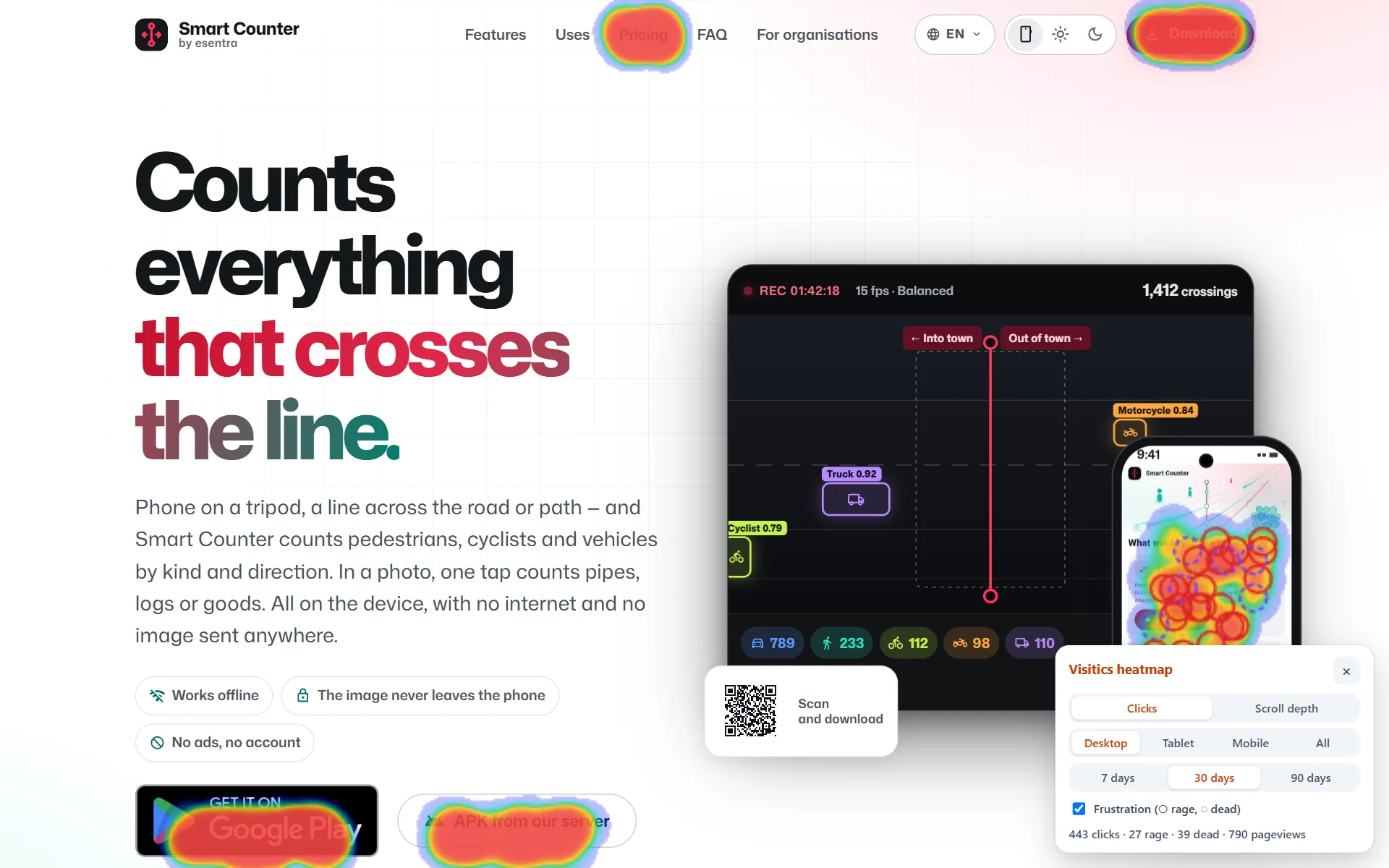
See where people click, which buttons they miss and how far they read, separately for desktop, tablet and mobile. One click opens the heatmap over your real page. No recordings of mouse movement or typing.

What it is for

What it helps you with

  1. 01

    See what gets attention

    The heat of clicks shows which buttons, links and pictures people use — and which they pass by.

  2. 02

    Find false clicks

    Dead clicks on things that look clickable and rage clicks are marked, so you see what people expect from the page.

  3. 03

    Check the fold

    The scroll depth shows how many visitors reach every part of the page — and whether your call to action is seen.

How it works

Real screens of the dashboard

1

The heatmap in the dashboard

Pick a page and a device: the clicks are drawn over the outline of the page, with the most clicked elements by name and the scroll depth on the side.

  1. 1The pages with their clicks
  2. 2The clicks over the outline of the page
  3. 3The most clicked elements with rage and dead clicks
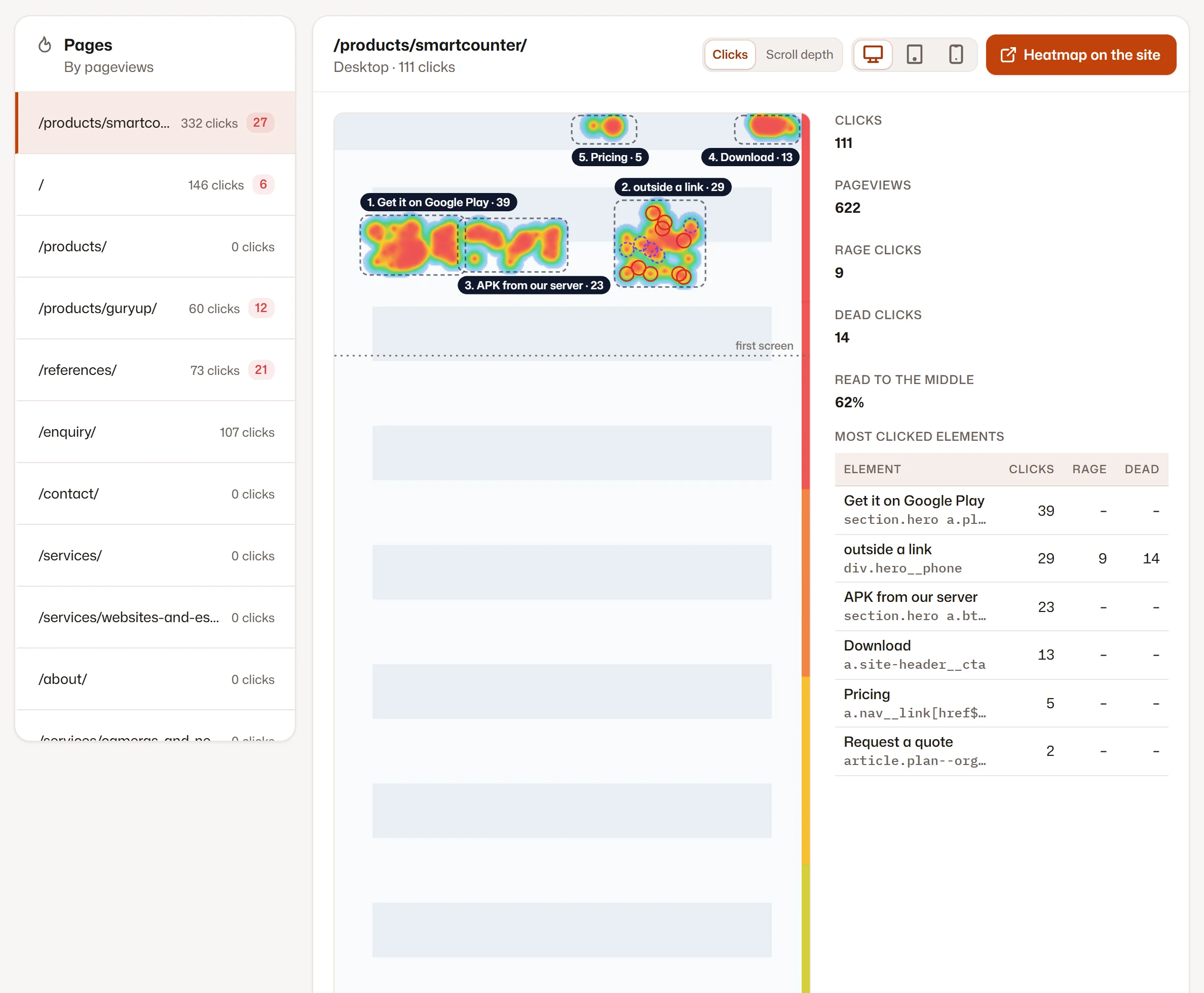
The heatmap in the dashboard
2

Over your live page

“Heatmap on the site” opens your real page with the heatmap on top, through a signed link valid for two hours. Nothing is measured while you look.

Over your live page

Screenshots of the Visitics dashboard with demo data.

In detail

How it works under the hood

Clicks that fit any screen width

Every click is stored with the element it hit and its position inside that element, so it lands in the right place on a narrower or wider screen too. Desktop, tablet and phone are kept apart by the window width: under 768 px a phone, under 1,024 px a tablet.

Scroll depth and the elements

The scroll map shows how many visitors reached each part of the page, with the edge of the first screen marked. The most clicked elements are listed with their label and CSS selector, with their rage and dead clicks next to them.

Your live page, safely

“Heatmap on the site” opens your real page with the heatmap on top, through a signed link that works for two hours and one page. While it is open the tracking script measures nothing, and your site needs no sign-in and no cookie for it.

90 days of clicks, no fingerprint

Clicks carry no visitor fingerprint, so they can stay 90 days and you can pick any period within them. The label of a clicked button or link is kept; nothing from a form ever is.

Heatmaps that work with the rest

From Aura a heatmap can be split by A/B test variant. The spots visitors mark with “point at the page” in a survey appear in the heatmap, and the problem elements of the frustration report link to their heatmap.

Everything it does

Everything in Heatmaps

  • A heatmap of clicks for desktop, tablet and mobile
  • Rage clicks and dead clicks marked separately
  • The most clicked elements with their name and CSS selector
  • A scroll-depth map with the edge of the first screen
  • The heatmap over your live page with one click, through a signed link valid for 2 hours
  • Click positions of the last 90 days, for any period within them
  • Heatmaps by A/B test variant (from Aura)
  • No recording of mouse movement, typing or the content of forms

Privacy

What is stored — and what is not

Stored

  • The position of a click relative to the page and the clicked element
  • The label of a clicked button or link (without values of fields)
  • Click positions for 90 days, without a fingerprint

Never stored

  • Session recordings or mouse movement
  • What visitors type
  • Screenshots of your visitors’ screens

How Visitics measures without cookies

Plans

Heatmaps in the plans

The values come straight from the price list. Every new organization tries Aura free for 14 days, without a payment card.

Heatmaps in the plans
Novafree for good Pulse€9 a month Aura€29 a month Luna€79 a month
Pages with a heatmap The home page 5 50 Unlimited
History 1 month 6 months 12 months 24 months
Start free Choose Pulse Choose Aura Choose Luna

See the pricing

Questions

Questions about Heatmaps

How is it different from Hotjar or Clarity?

Visitics records no sessions: it keeps the position of a click and the clicked element, not a replay of the visit. That is less data about people, no cookies, and the heatmap still shows what works on the page.

Do I need to set up every page?

No. Clicks are collected on every page by the tracking script; the plan decides how many pages show their heatmap. The free Nova plan has the heatmap of your home page and stores only its clicks.

Why do I see the page as an outline?

The dashboard draws the clicks over a sketch of the page built from the clicked elements, so nothing of your page is copied to us. For the real look, open the heatmap over your live page.

Does it work on single-page applications?

Yes, a change of the address counts as a new page and its clicks belong to it.

How many pages have a heatmap?

Nova shows the heatmap of your home page, the paid plans more pages (see the table above). From Pulse the clicks of all pages are collected, so a page you add later shows its last 90 days at once.

Can I see the heatmap of one A/B test variant?

Yes, from Aura: the heatmap of a page can be filtered by the variant visitors saw, so you see whether the change moved the clicks.

Try Heatmaps on your site

One line of code and the first data within seconds. Aura free for 14 days, then Nova for good — no payment card.