Skip to content
Visiticsby esentra
EN

From the Pulse plan

Website surveys that show the visit behind every answer

Ask your visitors why: after an order, when they leave the cart or when something does not work. Every answer comes with the page, device, channel and frustration signals of the same visit — and the ones who want a reply go to a shared Inbox.

What it is for

What it helps you with

  1. 01

    The reason behind the numbers

    Analytics shows that people leave the cart; one question tells you it is the shipping cost.

  2. 02

    Answers with their context

    Each answer knows its page, device and the rage clicks of the same visit — so “it does not work” becomes a bug you can find.

  3. 03

    Considerate to visitors

    At most one survey a day, never while people type or chat, in the checkout only after the order — and a control group shows the effect on sales.

How it works

Real screens of the dashboard

1

Results at a glance

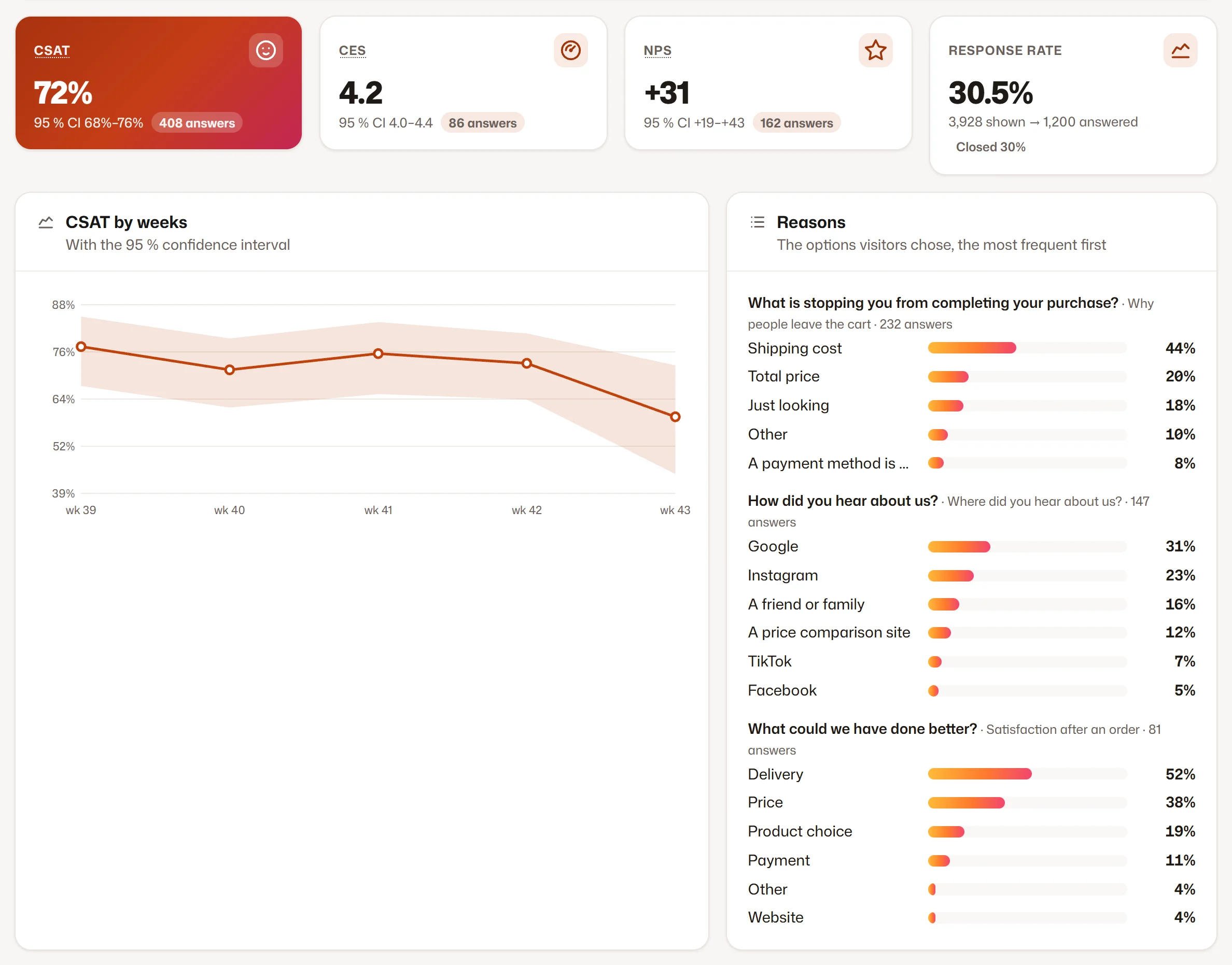
CSAT, CES and NPS with their trend and confidence, the reasons people give and the topics found in the texts.

  1. 1The scores with their trend
  2. 2Topics and reasons
Results at a glance
2

Every answer with its visit

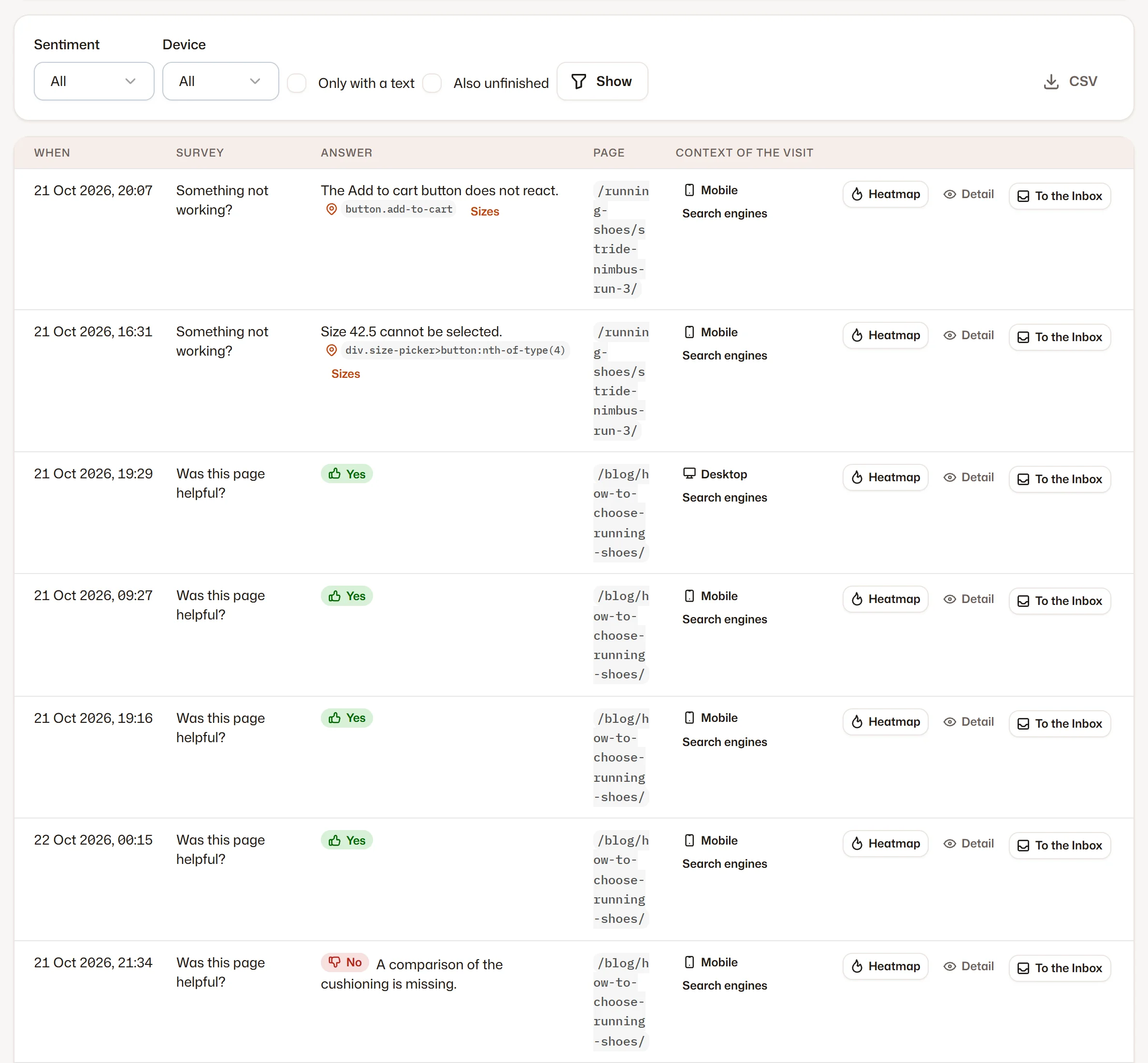
The answers with the page, device, channel and frustration signals of the visit, and a link to the heatmap.

  1. 1Answers with the context of the visit
Every answer with its visit
3

The shared Inbox

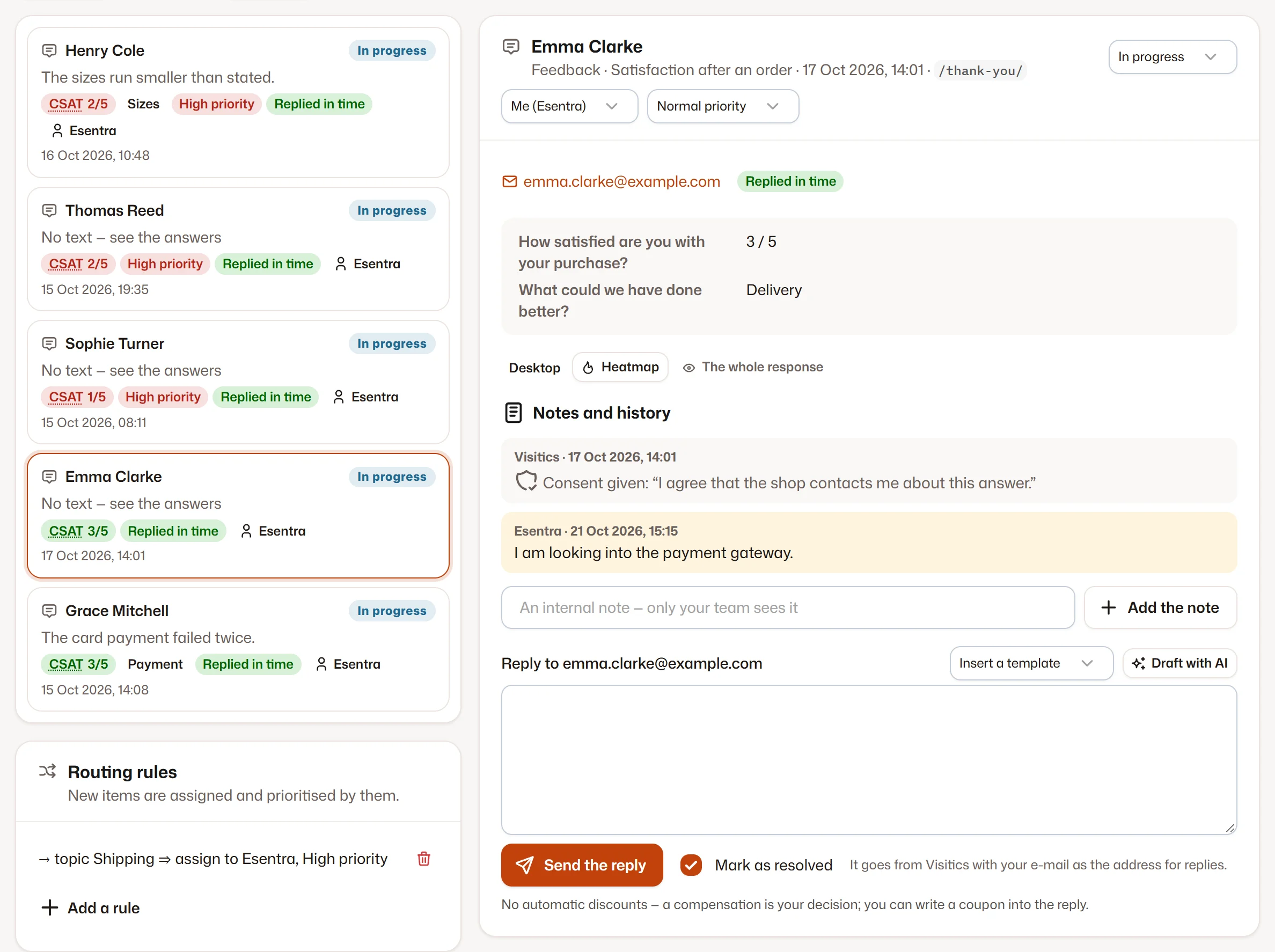
Answers with a contact and requests from the chatbot in one place: status, assignment, notes and a reply by e-mail from your templates.

  1. 1Open items
  2. 2Status, assignment and the reply
The shared Inbox

Screenshots of the Visitics dashboard with demo data.

In detail

How it works under the hood

13 templates and your own surveys

Satisfaction after an order (CSAT), ease of purchase (CES), recommendation (NPS), why the cart is left, how they found you, “Was this page helpful?”, “Did you find what you were looking for?”, an empty search, a 404 page, what is missing for a decision, “Something broken?”, the chatbot rating and a side tab. From Aura you build your own with steps, conditions and an earlier answer in a later question.

The right moment

A survey opens on an event such as an order, after a time, when the visitor is idle or scrolls, on exit intent, after frustration, a quick return, a search, a 404 or the end of a chat. It can be limited to pages, devices, languages, channels, a sample of visits and a quota of answers.

Considerate by design

A visitor gets at most one proactive survey a day — ensured without cookies, by the daily fingerprint. Never while they type or while Luna offers help, and in the checkout only after the order. The survey window loads only when a survey is shown.

Analysis you can rely on

CSAT, CES and NPS come with confidence intervals. Topics and sentiment are found by the AI on our server at night, factors by segment appear from 30 answers, and the effect against the control group uses a two-proportion test. Goals send alerts, and the voice of the customer comes in the weekly e-mail.

A library of questions in every language

A question saved from the builder keeps one key in every survey that uses it, so you compare its result across surveys and sites. A survey can run in every language of the interface; the AI can draft a missing language, marked as a draft until a person checks it.

The Inbox

Answers with a contact and the requests from Luna share one Inbox: status, assignment, priority, internal notes and a reply by e-mail from your templates, or an AI draft you edit. From Aura also the first-reply time with a reminder and routing rules by topic, page, score or source.
Everything it does

Everything in Feedback

  • 13 templates: CSAT after an order, CES, NPS, why the cart is left, how they found you, “Was this page helpful?” and more
  • Your own surveys with steps, conditions and the earlier answer in a later question (from Aura)
  • A corner window, a centred window, a side tab or inside the page
  • Triggers: an event, time, scrolling, exit intent, frustration, a search, a 404, the end of a chat
  • “Point at the page” — the visitor marks the element they mean, without screenshots
  • Topics and sentiment by AI on our own server; goals with alerts; the voice of the customer in the weekly report
  • A control group that measures the effect of the surveys on orders (from Aura)
  • The shared Inbox with assignment, notes, reply templates and SLA (SLA from Aura)

Privacy

What is stored — and what is not

Stored

  • The answers with the page, device, country and channel of the visit
  • A contact only with the visitor’s consent, deleted after the site’s retention
  • E-mails and phone numbers in texts masked

Never stored

  • Cookies — one survey a day is ensured without them
  • Screenshots of the visitor’s screen
  • A contact without the visitor’s consent

How Visitics measures without cookies

Plans

Feedback in the plans

The values come straight from the price list. Every new organization tries Aura free for 14 days, without a payment card.

Feedback in the plans
Novafree for good Pulse€9 a month Aura€29 a month Luna€79 a month
Active surveys per site Not in this plan 2 10 Unlimited
Answers Not in this plan 300 a month 3,000 a month 10,000 a month
Your own surveys in the builder Not in this plan Not in this plan Included Included
Shared Inbox Not in this plan Included Included Included
Start free Choose Pulse Choose Aura Choose Luna

See the pricing

Questions

Questions about Feedback

Will surveys annoy my visitors?

At most one proactive survey a day per visitor, never while they type or chat, in the checkout only after the order. A survey can be limited to pages, devices, languages, channels and a sample.

In which languages can a survey run?

In every language of the interface you choose; the AI on our server can draft the texts of another language, marked as a draft until a person checks them.

Where do the answers with a contact go?

To the shared Inbox with the chatbot’s requests: you assign them, add notes and reply by e-mail from your templates.

Which plan has surveys?

From Pulse, with templates; Aura adds your own surveys, the control group and AI topics (see the table above). The free Nova plan has no surveys.

What happens to the contacts visitors leave?

A contact is stored only with the visitor’s consent and goes to the Inbox. The contact and the message of a resolved item are deleted after the retention of your site — 180 days by default, adjustable from 30 to 730.

Does the monthly limit stop my analytics?

No. When the answers of the month are used up, surveys stop showing until the next month; the results and the analysis stay available.

Try Feedback on your site

One line of code and the first data within seconds. Aura free for 14 days, then Nova for good — no payment card.