Skip to content
Visiticsby esentra
EN

From the Pulse plan

Form analytics: find the field where people give up

Every form with its views, starts and successes, and for every field the time, hesitation, corrections, errors and the share of people who leave right there — with advice on what to fix. What visitors type is never stored.

What it is for

What it helps you with

  1. 01

    Find the field that costs you

    The field where most people give up is marked on every form — often a phone number, a postcode or a password.

  2. 02

    Know why

    Long hesitation, returns, corrections and error messages show whether a field is unclear, too strict or broken.

  3. 03

    Hear when a form breaks

    A warning appears when a form stops sending — and from Aura an e-mail alert the next day.

How it works

Real screens of the dashboard

1

All forms in one list

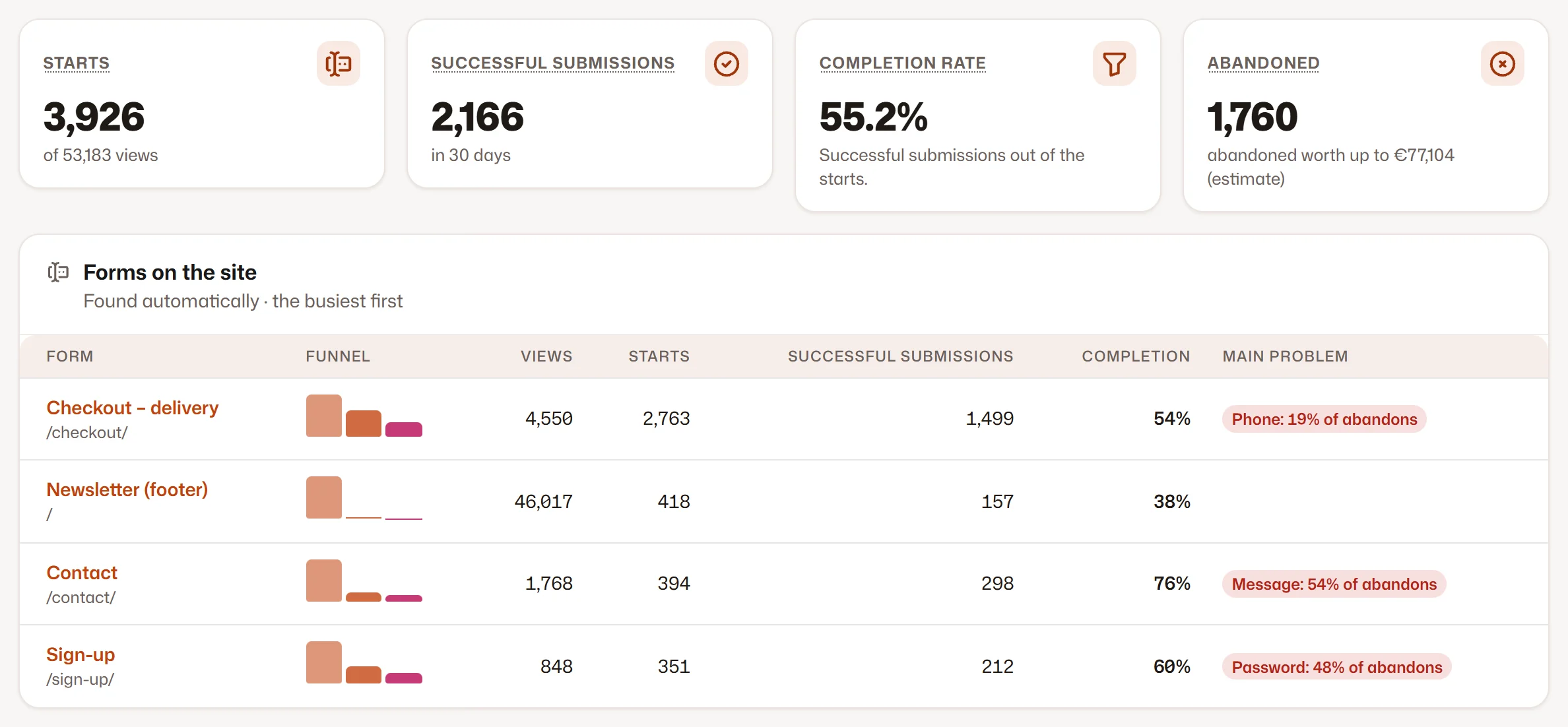
Views, starts, successes and the completion rate of every form with its change, and the field where most people give up.

  1. 1The forms with their completion rate
  2. 2The field with the most abandonments
All forms in one list
2

One form, field by field

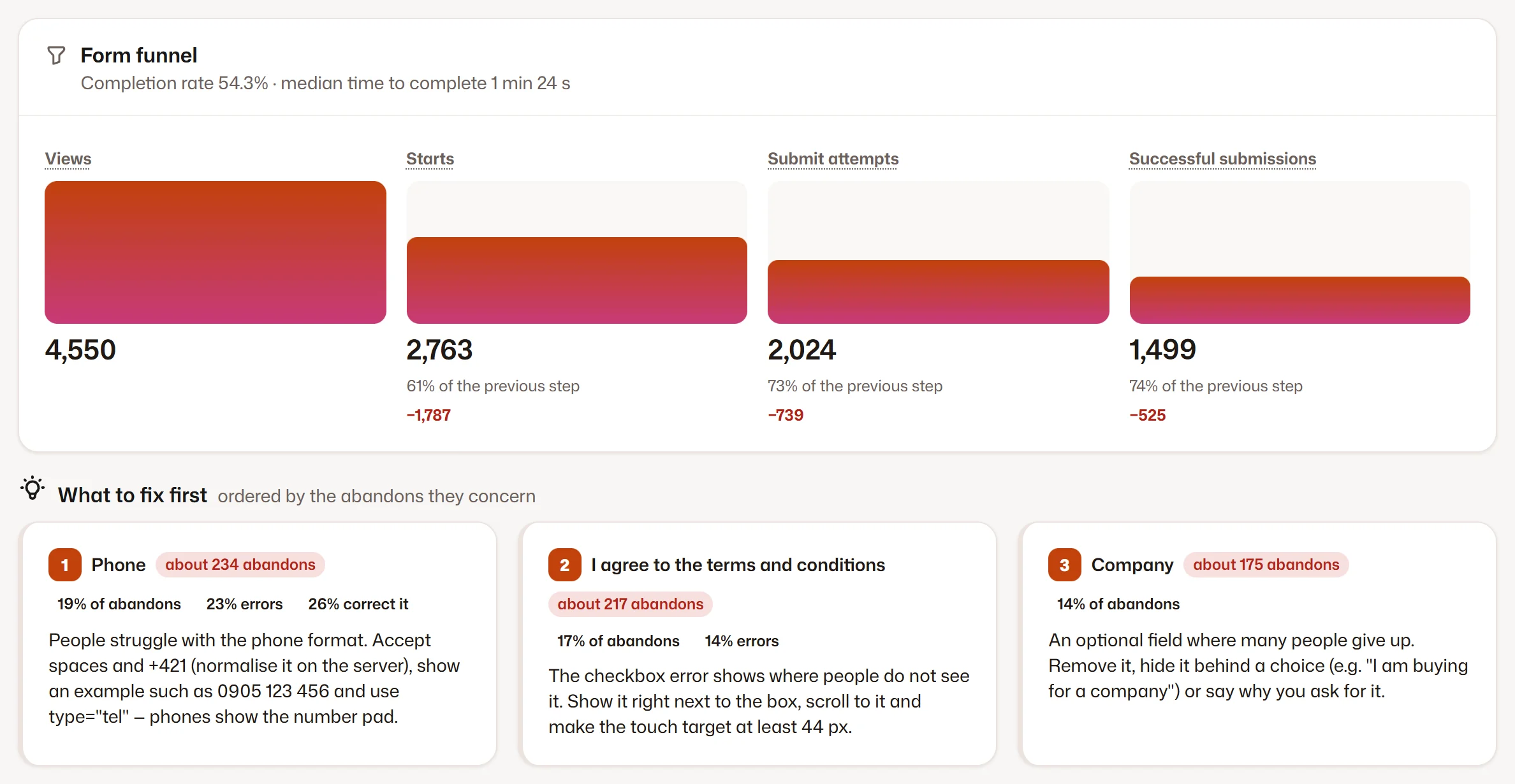
The funnel of the form, “what to fix first” and every field with its friction from 0 to 100, its errors and its time.

  1. 1The funnel of the form
  2. 2What to fix first
  3. 3The fields with their friction
One form, field by field

Screenshots of the Visitics dashboard with demo data.

In detail

How it works under the hood

Field by field, without values

For every form and pageview Visitics measures how long each field was in focus, how long people hesitated, returns and corrections, fields left blank at a submit, autofill and paste, and the kind of an error — the browser’s own check or the message of your site. One summary is sent when the page is left.

When is a form successful?

Your rule decides first: a thank-you page or an event within 30 minutes. Without one, Visitics reads what the page did — the form disappeared, a success message appeared, an order, lead or contact event followed, or the next page was a different one.

What to fix first

Rules over the metrics turn the numbers into advice, and every field gets a friction score from 0 to 100. A warning appears when a form that used to be sent may have stopped working; from Aura an e-mail alert comes too.

A check of the markup

Visitics also checks the form itself: fields without a label, a missing autocomplete, the wrong keyboard for a phone number or a postcode on phones, and checkboxes too small to tap.

Loaded only where needed

The forms module loads after the page, and only on pages with a form your site measures. Search boxes are skipped, data-visitics-ignore leaves out a form or a field, and data-forms="off" on the script tag switches the module off entirely.

Everything it does

Everything in Form analytics

  • Views, starts, successes and the completion rate of every form
  • For every field: time, hesitation, returns, corrections, blanks and errors
  • The field where people give up most, and friction from 0 to 100
  • “What to fix first” from rules over the metrics
  • The error messages, from the browser or your own
  • A check of the markup: labels, autocomplete, the right keyboard on phones, small checkboxes
  • A warning when a form may have stopped working; an e-mail alert from Aura
  • Devices and completed against abandoned visits from Aura

Privacy

What is stored — and what is not

Stored

  • Times and counts per field, summarised by day
  • The kind of an error (and the message, masked)
  • Whether a field was filled by autofill or paste

Never stored

  • What visitors type into a field
  • Passwords, card numbers or the clipboard
  • Keystrokes

How Visitics measures without cookies

Plans

Form analytics in the plans

The values come straight from the price list. Every new organization tries Aura free for 14 days, without a payment card.

Form analytics in the plans
Novafree for good Pulse€9 a month Aura€29 a month Luna€79 a month
Forms with details Not in this plan 3 20 Unlimited
Devices, completed vs abandoned, e-mail alert Not in this plan Not in this plan Included Included
Start free Choose Pulse Choose Aura Choose Luna

See the pricing

Questions

Questions about Form analytics

Do I have to mark my forms?

No. Forms are found on the page by themselves; a data-visitics-form attribute only gives a form a name, and data-visitics-ignore leaves one out.

How does Visitics know a form was sent successfully?

From your rule (a thank-you page or an event), otherwise from what the page did: the form disappeared, a success message appeared, or an order or lead event followed.

Is any personal data stored?

No values, ever. Only times, counts and the kind of an error; error messages are masked on our server before they are stored.

Which plan has form analytics?

The list of all forms with their views, starts and successes is in every plan. The details field by field start in Pulse, with a number of forms per plan (see the table above).

Is it safe on payment forms?

Yes. No value, no keystroke and nothing from the clipboard is ever read — only times, counts and the kind of an error. A field can also be left out with data-visitics-ignore.

Can the AI analyst explain my forms?

Yes. From Aura the AI analyst reads the form reports and tells which field costs the most completions and why.

Try Form analytics on your site

One line of code and the first data within seconds. Aura free for 14 days, then Nova for good — no payment card.