Skip to content
Visiticsby esentra
EN

Free in Nova and every plan

Frustration signals: rage clicks, dead clicks and JavaScript errors

Visitics watches the moments when something on your site does not work: repeated clicks on one spot, clicks without a response, errors after a click and going back within seconds. For every signal you see the page and the exact element.

What it is for

What it helps you with

  1. 01

    Bugs your visitors find

    A button that does not react or a script that fails shows up in the numbers before anyone writes to you.

  2. 02

    The exact element

    Not only which page, but which button or picture — with its selector and a link to the heatmap.

  3. 03

    Priorities by traffic

    Pages are ranked by frustrated pageviews, so the fix with the biggest effect comes first.

How it works

Real screens of the dashboard

1

Frustration at a glance

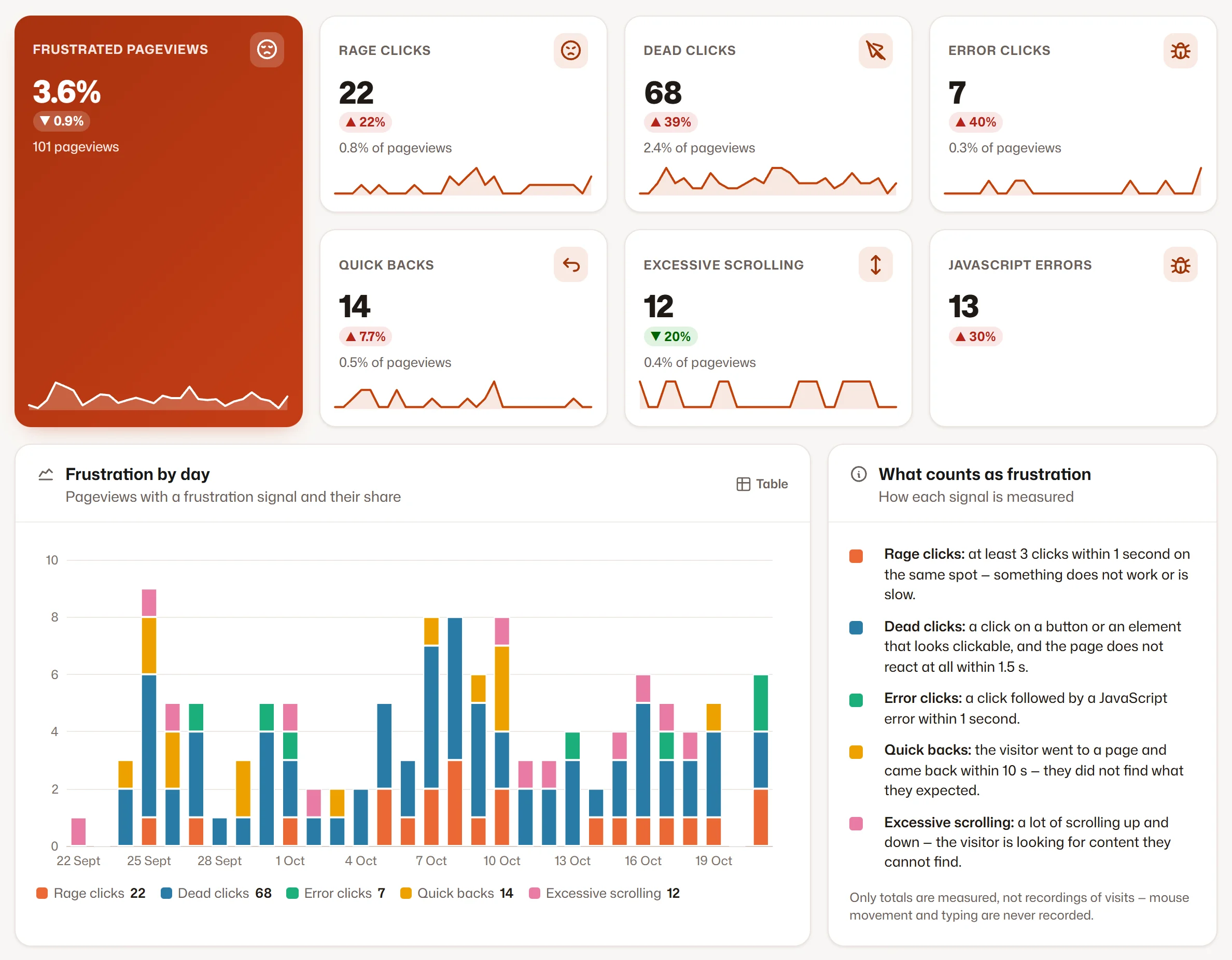
The share of frustrated pageviews, every signal with its change, and the frustration by day.

  1. 1Frustrated pageviews
  2. 2Each signal with its change
  3. 3Frustration by day
Frustration at a glance
2

Pages, elements and errors

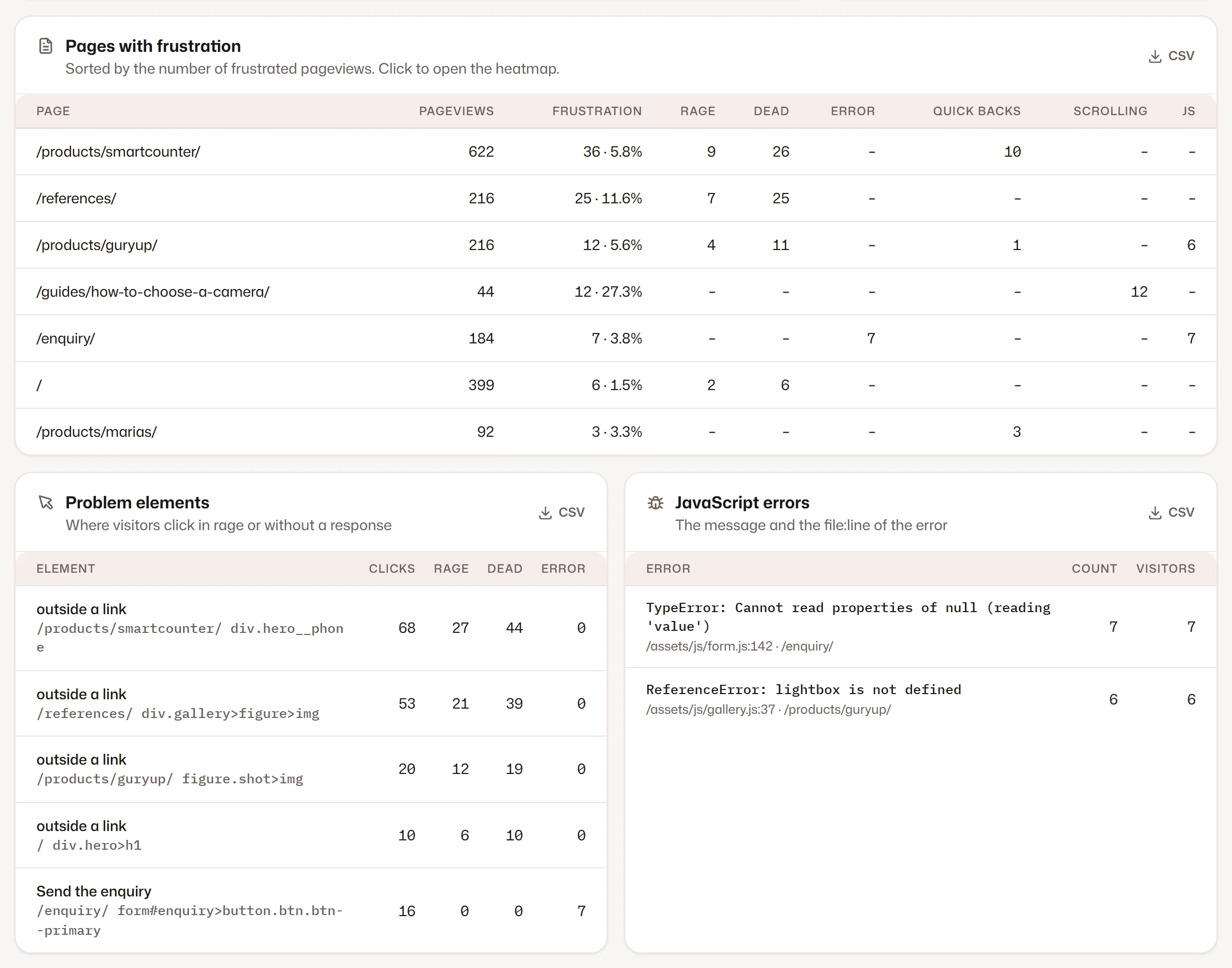
The pages with the most frustration, the elements behind it and the JavaScript errors with their file and line.

  1. 1Pages with frustration
  2. 2Problem elements
  3. 3JavaScript errors with file and line
Pages, elements and errors

Screenshots of the Visitics dashboard with demo data.

In detail

How it works under the hood

Rage clicks

At least three clicks within one second inside a radius of 30 pixels. They usually mean a button that reacts too slowly, an element that looks clickable but is not, or a page that seems frozen.

Dead clicks and error clicks

A dead click hits a button or an element that looks clickable, and the page does not respond within 1.5 seconds. An error click is followed by a JavaScript error within one second — the clearest sign of a broken feature.

Quick backs and excessive scrolling

A quick back is a return to the previous page within 10 seconds: the page did not deliver what the link promised. Excessive scrolling is at least four changes of direction, or two with more than three and a half page heights scrolled — the visitor is searching for something.

JavaScript errors, grouped

Uncaught errors are recorded with their message, file and line, and the same error is counted together. A rise of errors on a site triggers an alert the next morning.

Frustration works across Visitics

The same signals can open a survey at the right moment, let Luna offer help, pause an A/B test variant that breaks the page and raise an SEO problem on a page where visitors struggle.

Everything it does

Everything in Frustration signals

  • Rage clicks: at least 3 clicks within 1 second on the same spot
  • Dead clicks: a click on something that looks clickable without a response within 1.5 s
  • Error clicks: a click followed by a JavaScript error
  • JavaScript errors with the message, the file and the line
  • Quick backs: back to the previous page within 10 seconds
  • Excessive scrolling up and down
  • Pages and elements ranked by frustration, with a link to the heatmap

Privacy

What is stored — and what is not

Stored

  • Counts of every signal by page and element
  • The message of a JavaScript error, its file and line
  • The selector and label of the element

Never stored

  • Session recordings
  • What visitors type
  • Values of form fields in the error messages

How Visitics measures without cookies

Plans

Frustration signals in the plans

The values come straight from the price list. Every new organization tries Aura free for 14 days, without a payment card.

Frustration signals in the plans
Novafree for good Pulse€9 a month Aura€29 a month Luna€79 a month
Frustration signals and JavaScript errors Included Included Included Included
History 1 month 6 months 12 months 24 months
Start free Choose Pulse Choose Aura Choose Luna

See the pricing

Questions

Questions about Frustration signals

What counts as frustration?

Rage clicks, dead clicks, error clicks, JavaScript errors, quick backs and excessive scrolling. A pageview with at least one of them counts as frustrated.

Is a dead click always a bug?

Not always — sometimes people click a picture or a heading they expect to open. That is useful too: it tells you what visitors want from the page.

Do I need anything extra for JavaScript errors?

No. The tracking script records uncaught errors by itself, with the file and line, and groups the same error together.

Is it in the free plan?

Yes, frustration signals and JavaScript errors are in every plan, also in the free Nova plan.

Does a signal tell me who had the problem?

No. Signals are counted by page and element, without a recording of the visit and without anything that identifies the visitor. You see where the problem is, not who had it.

How do I find the cause of a dead click?

Open the element in the list: you see its label and CSS selector, its page and a link to the heatmap, where the clicks around it show on desktop, tablet and phone.

Try Frustration signals on your site

One line of code and the first data within seconds. Aura free for 14 days, then Nova for good — no payment card.