Skip to content
Visiticsby esentra
EN

From the Pulse plan

E-commerce analytics that shows what really sells

Revenue, orders, the average order and the purchase rate, the path from a product to the checkout, and the sources and campaigns that bring buyers — in the same dashboard as your traffic. If your shop already sends Google Analytics 4 e-commerce events, one switch is all it takes.

What it is for

What it helps you with

  1. 01

    Revenue next to the traffic

    Orders and revenue sit beside visitors and sources, so you see which channel brings buyers, not just clicks.

  2. 02

    Where the purchase stops

    The purchase funnel shows how many people viewed a product, added it to the cart, started the checkout and bought.

  3. 03

    No extra tagging

    Visitics reads the GA4 events your shop already has — or gets the orders from our plugin, the Shopify pixel or the JavaScript API.

How it works

Real screens of the dashboard

I.

Revenue and the purchase funnel

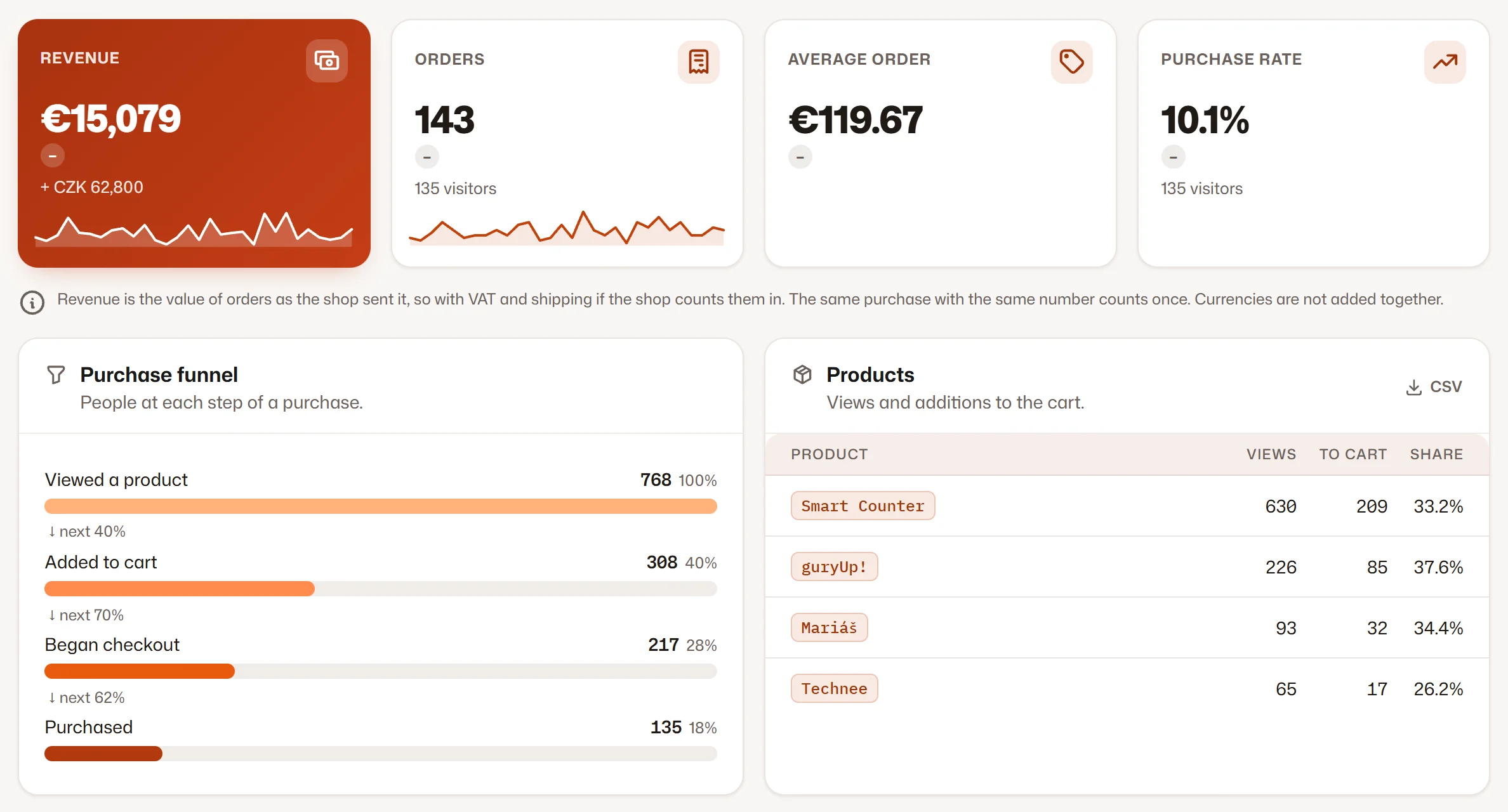
Revenue, orders, the average order and the purchase rate against the period before, and the funnel from a viewed product to a purchase.

  1. 1Revenue and orders with their change
  2. 2The purchase rate
  3. 3The purchase funnel step by step
Revenue and the purchase funnel
II.

What sells and who buys

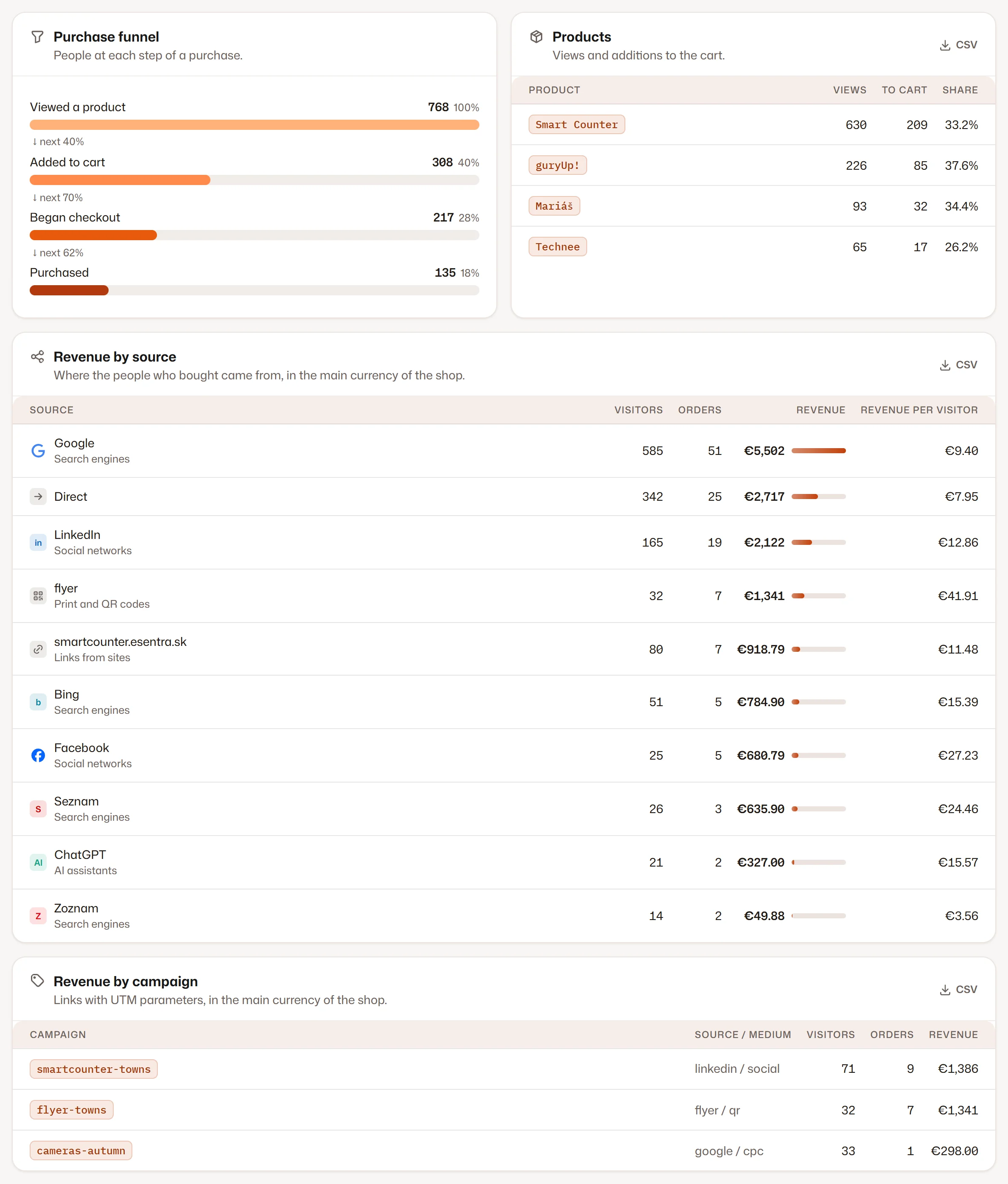
Products with their views and additions to the cart, and revenue by source and by UTM campaign — with the revenue per visitor.

  1. 1Products: views and additions to the cart
  2. 2Revenue by source
  3. 3Revenue by campaign
What sells and who buys

Screenshots of the Visitics dashboard with demo data.

In detail

How it works under the hood

Four steps of a purchase

Visitics follows the four GA4 events of a purchase: view_item, add_to_cart, begin_checkout and purchase. A step nobody reached is left out, so a shop that sends only its orders still sees its revenue without an empty funnel.

Read from the page, only when you say so

With the switch on, the tracking script reads the four events from the page’s dataLayer — no second script and no change of your theme. Off, it reads nothing. The switch sits with the other parts of the measurement in the Privacy tab of the website’s settings.

Orders from the server

The plugins for WooCommerce, PrestaShop, Shopware and Magento send every order once from your server with its number, value, currency and number of items — after the customer has their response, so nobody waits.

Revenue you can rely on

The same order number counts once, every order counts as a conversion, and revenue is never summed across currencies: the section shows the currency of most orders and the others beside it.

Revenue in the rest of Visitics

Revenue per order can be the goal of an A/B test, the SEO audit ranks problems by the revenue of their pages (from Aura), and the Stats API exports the revenue by source and the products.

Everything it does

Everything in E-commerce analytics

  • Revenue, orders, the average order and the purchase rate, compared with the period before
  • A purchase funnel: viewed product → added to the cart → checkout → purchase
  • Products with their views, additions to the cart and the add-to-cart rate
  • Revenue, orders and revenue per visitor by source and channel
  • Revenue and orders by UTM campaign
  • GA4 events read from the dataLayer: view_item, add_to_cart, begin_checkout and purchase
  • Orders from the Visitics plugins, the Shopify pixel or the JavaScript API
  • The same order number counts once; currencies are never added together

Privacy

What is stored — and what is not

Stored

  • The name of a product, the value, the currency and the number of items
  • A fingerprint of the order number for 24 hours, so an order counts once
  • Daily summaries of revenue by source, campaign and product

Never stored

  • The customer’s name, e-mail, address or payment details
  • Anything from the dataLayer other than the four events of a purchase
  • Cookies or a customer ID that follows a buyer across days

How Visitics measures without cookies

Plans

E-commerce analytics in the plans

The values come straight from the price list. Every new organization tries Aura free for 14 days, without a payment card.

E-commerce analytics in the plans
Novafree, no time limit Pulse€9 a month Aura€29 a month Luna€79 a month
E-shop section Not in this plan Included Included Included
History 1 month 6 months 14 months 26 months
Start free Choose Pulse Choose Aura Choose Luna

See the pricing

Questions

Questions about E-commerce analytics

Do I need to change my shop?

Usually not. If the shop sends Google Analytics 4 e-commerce events, for example through Google Tag Manager, switch on e-shop measurement in the settings of the website. Otherwise the Visitics plugin for WooCommerce, PrestaShop, Shopware or Magento, our Shopify pixel or the JavaScript API sends the orders.

Why is e-shop measurement off until I switch it on?

Reading the dataLayer means reading data from your page, so you decide whether it happens: the switch in the settings of the website is your instruction under the processing agreement. Until you switch it on, Visitics reads nothing from the dataLayer.

Is the revenue with VAT and shipping?

Revenue is the value of an order as the shop sends it — with VAT and shipping if your shop counts them in. With several currencies the section shows the currency of most orders and the others beside it; they are never added together.

What if a customer reloads the thank-you page?

An order with the same number counts once. Only a fingerprint of the number is kept, for 24 hours.

Which plan has it?

The E-shop section is in Pulse and higher (see the table above). In Nova an order still counts as a conversion of the goal “order”.

Does it work with Shopify, Shoptet or WooCommerce?

Shopify gets our pixel with all four steps; WooCommerce, PrestaShop, Shopware and Magento get plugins that send the orders from the server; Shoptet, Upgates and Wix get code that reads the order on the thank-you page. Any shop with GA4 e-commerce events in the dataLayer works with the switch alone.

Try E-commerce analytics on your site

One line of code and the first data within seconds. Aura free for 14 days, then Nova with no time limit — no payment card.